Screen Off Recorder app icon

Record video
with the screen off.

Screen Off Recorder records video in the background with the display switched off. There's no screen glow, less battery drain and no recording time limit. Your videos stay on your phone, with no account and nothing uploaded.

Get it on Google Play
Screen Off Recorder at a glance

Price
Free, with ads
In-app purchases
None
Requires
Android 6.0+
Account
Not needed
Video quality
Up to Full HD
Time limit
None
Watermark
None
Languages
30

Four screens, nothing in the way

How to record video with the screen off

Most camera apps stop the moment the display turns off, because the recording is tied to what's on screen. Screen Off Recorder runs the camera from a background service instead, so the display can go dark and the recording keeps going.

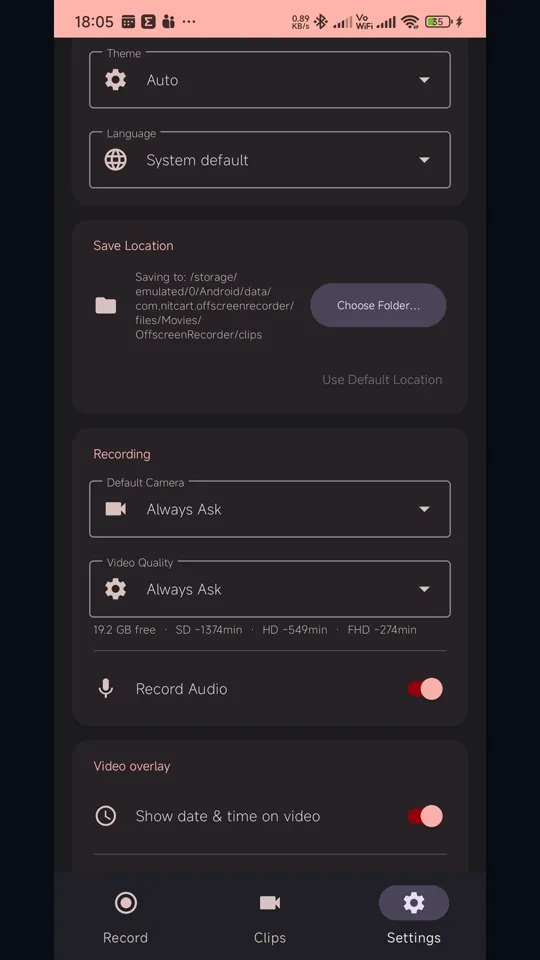
  1. Choose your settings Front or rear camera, SD, HD or Full HD, audio on or off, and an optional date, time or location stamp. Set a default, or leave it on "Always ask" to choose before each recording.
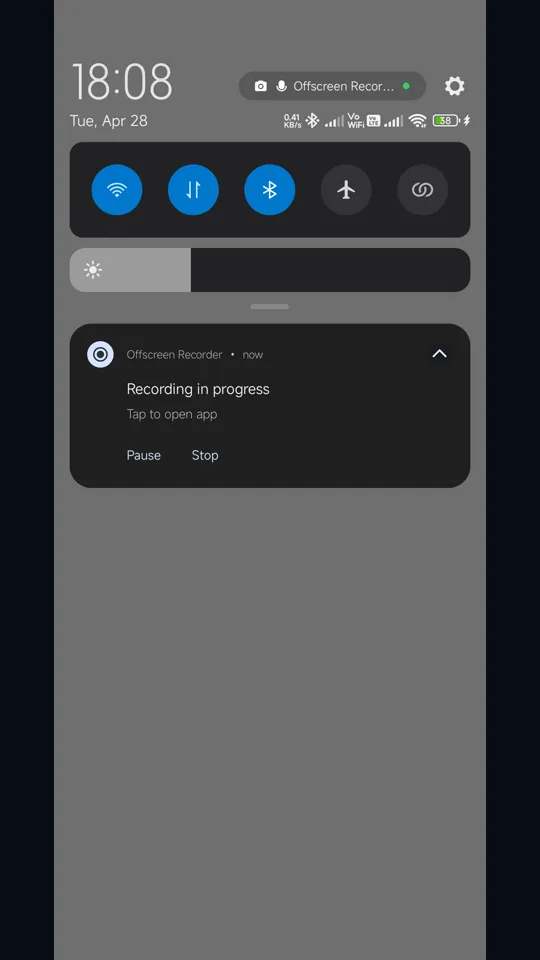
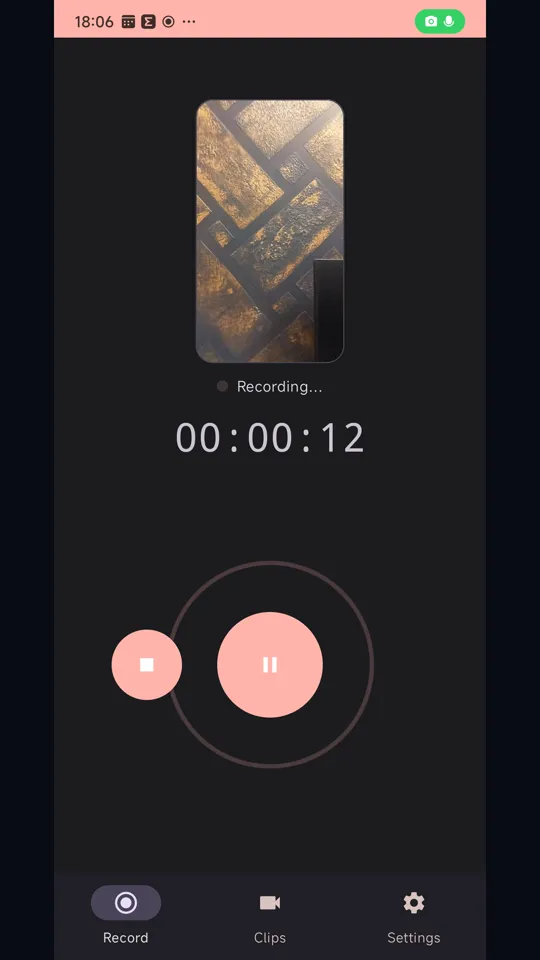
  2. Tap Record Recording starts and a "Recording in progress" notification appears. It stays visible for as long as the camera is running.
  3. Turn the screen off Lock the phone, put it in a pocket or on a stand, or switch to another app. The recording carries on in the background.
  4. Pause or stop whenever you like Use the buttons in the app or in the notification. Pausing and resuming continues the same video rather than starting a new file.
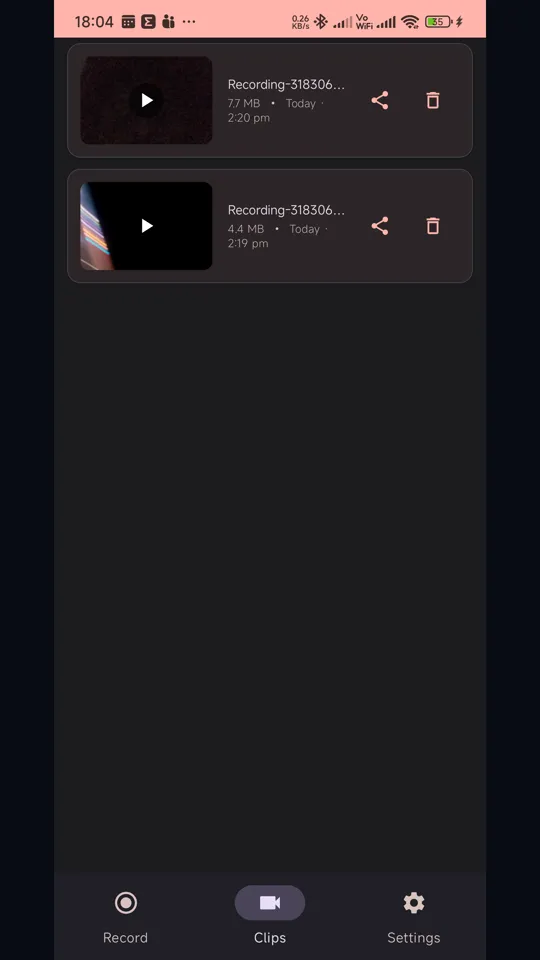
  5. Find it in Clips When you stop, the segments are merged into one MP4 and you'll see progress while it saves. The finished video shows up in Clips automatically.

Built for long background recordings

Lectures, meetings, road trips, wildlife watching, documenting an incident: anything where the recording needs to outlast the screen.

Screen-off recording

Keeps recording with the display completely off, and while you use other apps.

Dark screen, less drain

Nothing has to stay on the display while you record, so there's no screen glow and no battery spent lighting it.

Up to Full HD

Record in SD, HD or Full HD (1080p). Choose a default or pick each time.

No time limit

Record for as long as your storage allows. Settings estimates the minutes you have left at each quality.

Pause & resume

Pause and carry on from the app or the notification, without creating extra files.

Split, then merged

Long recordings are written in segments and joined into a single MP4 when you stop. No watermark.

Date, time & location

Optionally burn the date and time into every frame, and stamp your location onto the video.

Front or rear camera

Switch between cameras, and choose whether to record audio before you start.

Save where you choose

Keep videos in the app's storage, or send them to a folder you pick on the phone.

Questions worth asking first

Install Screen Off Recorder, pick your camera, quality and audio in Settings, then tap Record and press the power button. The screen turns off and recording carries on in the background until you tap Stop, either in the app or in the notification.

Yes. The camera runs in an Android foreground service rather than in the app's screen, and a wake lock keeps the processor awake for the session. Recording continues when you turn the display off, lock the phone or switch to another app, and stops only when you tell it to.

There's no time limit. The only limit is free storage, and Settings shows roughly how many minutes of SD, HD and Full HD video will fit in the space you have.

While it records, the app writes a long session as a series of fixed-length segments. When you stop, it joins them into one MP4 automatically. You'll see progress while it saves, and the finished video appears in Clips as soon as it's ready.

Less than recording with the screen on, because the display is usually the biggest drain and here it's off. The camera and video encoder still use power, and Full HD uses more than SD. For sessions of several hours, plug the phone in.

By default, videos go to the app's own storage folder, which Android removes when the app is uninstalled. If you choose a folder under Save location in Settings, finished videos go there instead and stay after an uninstall. Either way, share or move anything you want to keep before uninstalling.

Yes. Pause and resume from the app or from the notification. Resuming continues the same recording, and you get one video when you stop.

The app doesn't hide that it's recording. Android shows its camera and microphone indicator while the camera is in use (on Android 12 and later), and a "Recording in progress" notification stays up the whole time. Please record only where you have the right to, and follow the laws on recording video and audio where you live.

No. There's no account and no cloud. Video, audio and location stay on your phone, and recording works with no connection at all. The app shows ads, which do need a connection, but the ad code has no access to your recordings. The privacy policy sets out exactly what it collects.

Any phone running Android 6.0 or later. The app is available in 30 languages, and you can pick one in Settings whatever your phone itself is set to.

Yes. It's free on Google Play and supported by ads, with no in-app purchases, no account and no watermark on your videos.

Other apps you might like

Let the screen sleep

Free on Google Play. No account, no sign-up, and your videos stay on your phone.

Get it on Google Play